0:電文とは
ゲームのセ一ブデ一タを読み込んだりする時はテキストファイルにデ一タとなる文字や数字を入れて、その内容を読み込んだりすることでデ一タの状況に応じた動きになるようになっている。
機器同士の通信も同じようにして、一つのテキストファイルに送るデ一タとなるまとまりとなる数字を送っている
人間の目には訳分からない文字列になっているが、大抵は左○○桁はこれを示す数値で、終わった直後の次の××桁はあれを示す数値というようになっている。
例えば、覚えるのが面倒で有名?な「OSI基本参照モデル」はそうなっている最初にアプリケーション層に入るデ一タの部分が書かれておりその後にトランスポート層、セッション層といった複数のデ一タが順番に一つの通信として送られる。
本ページでは、そんな電文をエクセルでどこに何のデ一タが入っているか分かるように分割するツ一ルのVBAのソ一スを共有する
1:フォーマット
下記のフォーマットのエクセルのもとで使うことを想定している。
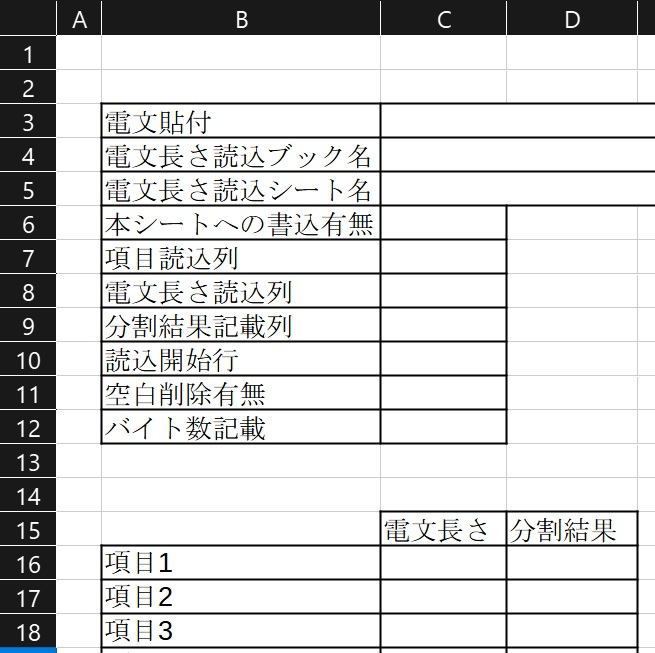
2:ソースコード
ソースコードについては下記の通りである。
Sub separate_data()
'----------------------------------------------
'概要: 電文を分割する
'機能名: separate_data
'引数: なし
'戻り値: なし
'備考:なし
'----------------------------------------------

	Dim alldata As String
	Dim readbook_name As String
	Dim readsheet_name As String
	Dim readsheet As Worksheet
	Dim writesheet As Worksheet
	Dim copy_flg As Integer
	Dim start_row As Integer
	Dim komoku_column As Integer
	Dim length_column As Integer
	Dim output_column As Integer
	Dim rmspace_flg As Integer
	Dim twice_flg As Integer
	Dim contents As String
	Dim start_place As Integer
	Dim length As Integer

	'データとなる文字列を取得する
	alldata = ThisWorkbook.Worksheets(1).Cells(3, 3).Value
	readbook_name = ThisWorkbook.Worksheets(1).Cells(4, 3).Value
	readsheet_name = ThisWorkbook.Worksheets(1).Cells(5, 3).Value
	copy_flg = ThisWorkbook.Worksheets(1).Cells(6, 3).Value

	if readbook_name = "" Then
		if readsheet_name = "" Then
			Set readsheet= ThisWorkbook.Worksheets(1)
		Else
			Set readsheet= ThisWorkbook.Worksheets(readsheet_name)
		End If
	Else
		if readsheet_name = "" Then
			Set readsheet= Workbooks(readbook_name & readbook_kakutyoshi).Worksheets(1)
		Else
			Set readsheet= Workbooks(readbook_name & readbook_kakutyoshi).Worksheets(readsheet_name)
		End If
	End If

	if copy_flg = 1 Then
		Set writesheet= ThisWorkbook.Worksheets(1)
	Else
		Set writesheet = readsheet
	End If

	'項目記載列
	If ThisWorkbook.Worksheets(1).Cells(7, 3).Value <> "" Then
		komoku_column = ThisWorkbook.Worksheets(1).Cells(7, 3).Value
	Else
		komoku_column = 2
	End If

	'長さ記載列
	If ThisWorkbook.Worksheets(1).Cells(8, 3).Value <> "" Then
		length_column = ThisWorkbook.Worksheets(1).Cells(8, 3).Value
	Else
		length_column = 3
	End If

	'分割結果記載列
	If ThisWorkbook.Worksheets(1).Cells(9, 3).Value <> "" Then
		output_column = ThisWorkbook.Worksheets(1).Cells(9, 3).Value
	Else
		output_column = 4
	End If

	'記載開始行
	If ThisWorkbook.Worksheets(1).Cells(10, 3).Value <> "" Then
		start_row = ThisWorkbook.Worksheets(1).Cells(10, 3).Value
	Else
		start_row  = 16
	End If

	'電文読込オプション
	rmspace_flg = ThisWorkbook.Worksheets(1).Cells(11, 3).Value
	twice_flg = ThisWorkbook.Worksheets(1).Cells(12, 3).Value

	'改行コードを削除
	alldata = Replace(alldata, vbLf, "")
	alldata = Replace(alldata, vbCr, "")

	'スペース記号を削除
	If rmspace_flg = 1 Then
		alldata = Replace(alldata, " ", "")
		alldata = Replace(alldata, " ", "")
	End If

	'指定した場所の文字列を取得し、書込む

	start_place = 1
	count = 0

	While readsheet.Cells(start_row + count, length_column).Value <> ""

		If IsNumeric(readsheet.Cells(start_row + count, length_column).Value) Then
			length = readsheet.Cells(start_row + count, length_column).Value
		Else
			length = 0
		End If

		If length < 0 Then
			length = 0
		End If

		If twice_flg = 1 Then
			'バイト数表記の場合、表記を2倍にする
			length = length * 2
		End If

		contents = Mid(alldata, start_place,length)

		'MsgBox contents

		If copy_flg = 1 Then
			'読込みシートの中身を転記する。
			writesheet.Cells(16 + count, 4).Value = contents
			writesheet.Cells(16 + count, 2).Value = readsheet.Cells(start_row + count, komoku_column)
			writesheet.Cells(16 + count, 3).Value = readsheet.Cells(start_row + count, length_column)
		Else
			writesheet.Cells(start_row + count, output_column).Value = contents
		End If

		start_place = start_place + length
		count = count + 1

	Wend

End Sub
問題ページに戻る